Best VPN for Privacy, Banking, and Work
Best VPN for Privacy
A good VPN can make everyday internet use more private, especially when you’re using hotel Wi-Fi, coffee shop Wi-Fi, coworking spaces, airports, rented apartments, or shared networks. It can hide your real IP address from websites, reduce what your internet provider can see, and encrypt traffic between your device and the VPN server.
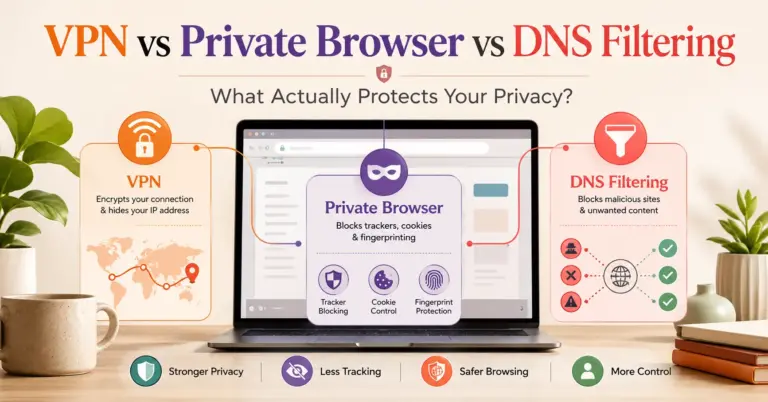
But let’s be clear from the start: a VPN is not a magic privacy cloak. It won’t stop phishing. It won’t make a hacked laptop safe. It won’t stop your bank, Google, Microsoft, Facebook, or a client portal from knowing who you are when you log in. And it won’t erase tracking cookies already sitting inside your browser.
That’s why the best VPN for privacy is not simply the fastest VPN or the one with the biggest discount banner. For privacy-conscious users, remote workers, freelancers, and anyone who does online banking, the better question is: which VPN has the right mix of verified no-log practices, secure protocols, leak protection, reliable apps, transparent ownership, and practical usability?
WireGuard, one of the most widely used modern VPN protocols, is designed around a simple public-key model and modern cryptography, while still being easier to configure than older VPN approaches. (WireGuard) But the provider operating the VPN still matters. You’re moving trust from your internet provider or local network to the VPN provider. That provider’s logging policy, audit history, app quality, and business incentives matter as much as the protocol.
What a VPN Really Does for Privacy
A VPN creates an encrypted tunnel between your device and a VPN server. Your internet provider can see that you’re connected to a VPN, but it generally can’t see the websites or services you access through that tunnel. Websites see the VPN server’s IP address instead of your home, office, hotel, or mobile network IP address.
That helps in several realistic situations:
- You don’t want your ISP building a profile of your browsing activity.
- You use public Wi-Fi and want another layer of protection.
- You travel and want a more consistent privacy setup.
- You freelance from shared networks and handle client accounts.
- You want to reduce IP-based tracking across websites.
- You need to separate personal browsing from local network exposure.
Still, modern web security is layered. The FTC notes that because HTTPS is now widespread, public Wi-Fi is generally safer than it used to be, but users should still check for HTTPS, use strong passwords, enable two-factor authentication, keep software updated, and watch for scams. (Consumer Advice)
What a VPN hides
A VPN can usually hide:
- Your real IP address from websites.
- Your browsing destinations from your ISP.
- Your traffic contents from local Wi-Fi snoopers when traffic is tunneled properly.
- Your DNS requests, if the VPN handles DNS correctly.
- Your approximate physical network location, at least at the IP level.
What a VPN does not hide
A VPN usually does not hide:
- Your identity after you log in to an account.
- Cookies, browser fingerprints, and account-based tracking.
- Malware already on your device.
- Phishing pages that trick you into entering a password.
- Payment details you voluntarily submit.
- Corporate monitoring on a managed work laptop.
- Activity inside apps that already collect telemetry.
FTC consumer guidance is blunt on this point: a VPN can make network traffic harder to intercept, but it does not prevent phishing or social-engineering attacks. (Consumer Advice)
Why “no-log VPN” needs proof
Almost every VPN says it does not log. That claim is only useful if you know what “logs” means.
A serious no-log VPN should explain whether it stores:
- Browsing history.
- DNS queries.
- Original IP address.
- VPN-assigned IP address.
- Connection timestamps.
- Bandwidth usage.
- Device identifiers.
- Payment and account information.
- Customer support records.
- Crash reports or diagnostics.
The strongest providers reduce what they collect, publish clear policies, undergo third-party audits, and avoid vague wording. Privacy Guides, an independent privacy-focused resource, recommends VPN providers that use encryption, support WireGuard and OpenVPN, and maintain a no-logging policy; its listed privacy-focused options include Proton VPN, IVPN, and Mullvad. (Privacy Guides)
Best VPNs for Privacy: Practical Shortlist
This shortlist is organized by use case, not by fake precision scoring. Different users need different trade-offs. A freelance developer handling client dashboards may need different features than someone who only wants private browsing on public Wi-Fi. A privacy maximalist may prefer anonymous signup and cash payment. A remote worker may need compatibility, stability, and split tunneling.
Best privacy-first pick: Proton VPN
Best for: privacy-conscious users who want a polished VPN with repeated no-log audits, mainstream apps, and a broader privacy ecosystem.
Proton VPN is one of the strongest all-around choices for people who want privacy but still need a usable app across devices. Proton says its no-logs policy has been checked through repeated annual third-party audits, and its 2025 audit page states that Securitum reviewed Proton VPN’s infrastructure and server-side operations. Proton also says the reports confirm it does not keep metadata logs or VPN activity logs. (Proton VPN)
Why it stands out:
- Strong privacy positioning.
- Repeated no-log audit history.
- Good fit for users who also care about encrypted email, password management, and privacy tools.
- Better mainstream usability than many niche privacy VPNs.
- Suitable for banking, travel, and daily private browsing.
Trade-offs:
- Some advanced privacy users may still prefer Mullvad or IVPN for anonymous signup culture.
- Premium plans can cost more than budget VPNs.
- As with any VPN, logged-in websites still know who you are.
Best use case: a US freelancer who wants one reliable VPN for public Wi-Fi, banking, research, travel, and daily browsing without using a fringe provider.
Best anonymous signup pick: Mullvad
Best for: users who want privacy by design, anonymous accounts, and minimal account friction.
Mullvad is unusually privacy-focused in how it thinks about accounts. Its homepage highlights “No logging” and “Anonymous accounts,” and it explicitly says a VPN is not enough for privacy, recommending a privacy-focused browser as part of a broader setup. (Mullvad VPN) Mullvad also published results from a VPN infrastructure audit by Assured AB, saying the audit found no information leakage or logging of customer data in the reviewed scope. (Mullvad VPN)
Why it stands out:
- Strong privacy-first brand identity.
- Anonymous account model.
- Simple flat pricing model.
- Good for users who dislike email-based account creation.
- Strong fit for private browsing and reducing ISP-level visibility.
Trade-offs:
- Not always the best choice for streaming-focused users.
- Less hand-holding than highly commercial VPN apps.
- Advanced privacy users still need to manage browser fingerprinting, cookies, and account tracking separately.
Best use case: a privacy-conscious user who wants a clean, no-nonsense VPN and does not want to build a full account profile just to subscribe.
Best minimalist privacy pick: IVPN
Best for: users who value transparency, ethics, clear logging claims, and a smaller privacy-focused provider.
IVPN is not always the loudest brand in mainstream VPN advertising, but it has a strong reputation among users who care about privacy fundamentals. IVPN says its VPN servers do not store logs that could identify a customer and that this claim is backed by a no-logs audit. (ivpn.net) Its 2019 Cure53 audit specifically reviewed no-logging claims across systems involved in serving customer VPN connections, including VPN gateway and authentication servers. (ivpn.net)
Why it stands out:
- Clear privacy positioning.
- Stronger appeal to technically aware users.
- Good fit for people who dislike bloated security bundles.
- Useful for private browsing, travel, and sensitive research.
- Transparent enough for readers who want to inspect claims more closely.
Trade-offs:
- Smaller network than some mainstream VPNs.
- Less mass-market polish than NordVPN, ExpressVPN, or Surfshark.
- Some audit materials are older than the latest audits from larger competitors, so users should review the most current audit page before purchase.
Best use case: a developer, journalist, researcher, or freelancer who wants a serious privacy VPN without a huge consumer-security suite attached.
Best mainstream work/travel pick: NordVPN
Best for: users who want a mainstream VPN with strong app support, extra privacy tools, and repeated no-log assurance engagements.
NordVPN is a commercial heavyweight, but it has also invested in third-party no-log assessments. Nord Security says NordVPN’s fifth independent no-log engagement was completed by Deloitte Audit Lithuania under ISAE 3000, following earlier engagements in 2018, 2020, 2022, and 2023. (Nord Security)
Why it stands out:
- Broad platform support.
- Extra features such as Double VPN, Onion Over VPN, dedicated IP options, and threat-protection tools.
- Good fit for remote workers who need a familiar app and quick support.
- Strong choice for travel, hotels, coworking spaces, and general private browsing.
- Useful when a user values mainstream reliability over maximum anonymity.
Trade-offs:
- Requires more trust in a large commercial provider.
- Extra tools can confuse users who only need a simple private browsing VPN.
- Dedicated IP can help with account stability but may reduce privacy compared with shared VPN IPs.
Best use case: a remote worker or frequent traveler who wants a polished VPN app, broad features, and a provider with repeated audit activity.
Best beginner-friendly audited pick: ExpressVPN
Best for: users who want an easy VPN experience with a long audit trail and simple apps.
ExpressVPN is often a good fit for beginners because the app experience is straightforward. Its Trust Center lists multiple independent audits, including audits of its no-logs policy, TrustedServer technology, Lightway protocol, browser extensions, apps, and related systems. (ExpressVPN) ExpressVPN also states in its Trust Center that it does not keep logs of online activities, browsing history, traffic destination, metadata, DNS queries, or assigned VPN IP addresses. (ExpressVPN)
Why it stands out:
- Beginner-friendly apps.
- Long public audit history.
- Good for users who want fewer technical decisions.
- Useful for travel and secure browsing on public Wi-Fi.
- Good fit for people who value support and simplicity.
Trade-offs:
- Often priced higher than budget providers.
- Less appealing to users who want anonymous signup-first design.
- Like all VPNs, it cannot protect users from phishing or unsafe account behavior.
Best use case: someone who wants a private browsing VPN that “just works” across laptop and phone without reading a manual.
Best value-for-many-devices pick: Surfshark
Best for: households, freelancers with multiple devices, and users who want VPN plus extra consumer security tools.
Surfshark’s official site highlights unlimited devices, 100+ countries, 4,500+ RAM-only servers, a no-logs policy, and features such as Dynamic MultiHop and IP Rotator. (Surfshark) Its Trust Center says Surfshark does not keep user activity logs such as IP addresses, browsing history, session information, bandwidth used, connection timestamps, or network traffic, and says it uses 100% RAM-only servers. (Surfshark)
Why it stands out:
- Unlimited device positioning.
- Useful for families or multi-device freelancers.
- RAM-only server claims.
- Extra tools such as tracker blocking and identity-related services.
- Competitive commercial positioning.
Trade-offs:
- Feature bundles can distract from the core VPN decision.
- Users should review renewal pricing carefully.
- Privacy purists may prefer simpler providers with less upsell complexity.
Best use case: a freelancer with a Windows laptop, MacBook, iPhone, Android test device, tablet, and shared household devices who wants one subscription across many endpoints.
Best simple casual-use pick: TunnelBear
Best for: casual users who want a simple, friendly VPN and appreciate public security audits.
TunnelBear has a lighter, more approachable brand than most VPN companies, but it has also published audit information. Its 2024 audit post says Cure53 performed a white-box assessment with access to source code, configurations, and internal documentation, covering applications, backend systems, public APIs, network entry points, data handling, and encryption layers. (TunnelBear: Secure VPN Service)
Why it stands out:
- Easy for beginners.
- Public audit culture.
- Good for basic privacy on public Wi-Fi.
- Less intimidating than technical VPN brands.
Trade-offs:
- Not the strongest pick for advanced privacy users.
- Not usually the best choice for power users who need deep configuration.
- May be less compelling for remote-work-heavy users than NordVPN, Proton VPN, or ExpressVPN.
Best use case: a non-technical user who wants simple VPN protection without studying protocols and audit reports.
VPN Comparison Table
| VPN | Best Fit | Privacy Strength | Banking Fit | Remote Work Fit | Main Trade-Off |
|---|---|---|---|---|---|
| Proton VPN | Best all-around privacy | Repeated no-log audits | Strong | Strong for freelancers | Premium features may cost more |
| Mullvad | Anonymous signup | Strong privacy-first model | Strong | Good for independent workers | Less mainstream polish |
| IVPN | Minimalist privacy | Clear no-log positioning | Strong | Good for technical users | Smaller mainstream footprint |
| NordVPN | Work/travel mainstream | Repeated assurance engagements | Strong | Strong usability | More commercial feature complexity |
| ExpressVPN | Beginner-friendly audited VPN | Long audit trail | Strong | Strong for simple setups | Often higher-cost positioning |
| Surfshark | Many devices/value | No-log and RAM-only claims | Good | Good for multi-device users | Bundle/renewal complexity |
| TunnelBear | Casual simple use | Public security audit culture | Good for basic use | Moderate | Less advanced feature depth |
Best VPN for Online Banking
A VPN for online banking is useful when you’re on public Wi-Fi, traveling, or using networks you don’t control. It can reduce local network exposure and hide your connection from the Wi-Fi operator. But online banking security depends more on the bank’s HTTPS implementation, your device security, your password, MFA, and phishing awareness than on the VPN alone.
The FTC explains that HTTPS protects information sent between your device and a website, and it advises users to look for HTTPS or a lock symbol. It also warns that scammers can create fake encrypted sites, so encryption alone does not prove the site is legitimate. (Consumer Advice)
What matters most for banking
For online banking, prioritize:
- A reputable paid VPN with clear no-log policy
- Kill switch
- DNS leak protection
- Stable US server options
- No shady browser extension requirement
- Strong app reputation
- Fast reconnect after sleep or network change
- No aggressive ad-injection or traffic modification
- Responsive support
- Ability to pause VPN if your bank blocks VPN IPs
Should you use a dedicated IP for banking?
A dedicated IP can reduce bank security alerts because your login location appears more consistent. However, it can also reduce privacy because your activity is less mixed with other VPN users.
Use a dedicated IP only if:
- Your bank frequently blocks shared VPN servers.
- You need fewer login challenges.
- You understand that dedicated IPs are less privacy-preserving than shared IPs.
For most privacy-focused users, start with a normal shared VPN server in your own country. If the bank complains, try another nearby server, then decide whether dedicated IP is worth the privacy trade-off.
Best banking-oriented picks
- Best privacy + banking balance: Proton VPN
- Best simple banking/travel setup: ExpressVPN
- Best mainstream remote worker option: NordVPN
- Best anonymous privacy-first option: Mullvad
- Best multi-device banking household: Surfshark
Best Secure VPN for Work and Freelancing
A secure VPN for work depends on what “work” means.
For a freelancer, a consumer VPN can help protect traffic on public Wi-Fi and reduce exposure while logging into client tools. For an employee accessing internal systems, the correct answer is usually the employer-approved VPN, enterprise SSO, device management, or zero-trust access system.
NSA and CISA guidance for remote-access VPNs emphasizes selecting reputable, standards-based products, using strong authentication such as MFA, patching promptly, and reducing attack surface. (NSA) That’s enterprise guidance, but the principle applies to individuals too: the VPN is one layer, not the whole security model.
Freelancers should care about these features
A freelancer often works across multiple client environments: Google Workspace, Microsoft 365, Slack, GitHub, WordPress, Shopify, payment dashboards, ad accounts, cloud hosting panels, and CRM systems. In that workflow, a VPN helps most when paired with:
- Password manager
- MFA app or hardware security key
- Separate browser profiles
- Updated OS and browser
- Anti-malware protection where appropriate
- Client-specific access rules
- Clean separation between personal and client work
Remote workers should avoid policy conflicts
Do not run a personal VPN over a corporate VPN unless your employer allows it. It can break routing, trigger security alerts, interfere with endpoint monitoring, or violate policy. If your work laptop is managed, assume your employer’s security stack takes priority.
Microsoft’s remote-work VPN guidance for Microsoft 365 recommends targeted split tunneling for key Microsoft 365 workloads such as Teams, SharePoint, and Exchange Online to reduce VPN saturation and improve performance, while preserving the security posture for other traffic. (Microsoft Learn)
For employees, the best VPN for work is the one approved by IT. For freelancers using their own devices, a reputable consumer VPN can still be valuable.
Best remote-work picks
- Proton VPN: strong privacy posture with polished usability.
- NordVPN: strong mainstream feature set for travel and work.
- ExpressVPN: simple setup for non-technical professionals.
- Surfshark: useful when one user has many devices.
- IVPN or Mullvad: better for privacy-focused independent workers.
How to Choose a Private Browsing VPN
A private browsing VPN should reduce unnecessary exposure without creating new risks. Avoid choosing only by server count or claimed speed. For privacy, the decision framework should be stricter.
1. Check the logging policy
Look for exact wording. “We don’t track you” is weaker than a policy that clearly says it does not store browsing history, DNS queries, original IP addresses, VPN IP assignments, timestamps, or bandwidth linked to an account.
2. Check audit scope
A no-log audit is more useful when it covers server configuration, authentication systems, operational procedures, and logging controls. An app security audit is useful too, but it is not the same as a no-log audit.
3. Check account requirements
Privacy-focused users may prefer:
- No email requirement.
- Anonymous account number.
- Cash or privacy-preserving payment option.
- Minimal personal data.
- No forced phone verification.
Privacy Guides lists Proton, IVPN, and Mullvad as recommended VPN providers and compares items such as WireGuard support, port forwarding, IPv6 support, and anonymous payment options. (Privacy Guides)
4. Check protocol support
WireGuard is generally a strong default for speed and modern cryptography. OpenVPN remains useful because it is mature, widely supported, and sometimes easier to use in restrictive networks. Some providers also offer proprietary protocols, such as ExpressVPN’s Lightway or NordVPN’s NordLynx.
5. Check leak protection
A VPN should protect DNS requests and prevent traffic leakage when the VPN reconnects. Proton VPN’s DNS leak support page notes that VPN apps may include DNS leak protection but that limited circumstances can still allow a computer to bypass protections. (Proton VPN)
6. Check app quality
A private VPN with a buggy app is not private enough. Look for:
- Kill switch that works.
- Auto-connect on untrusted Wi-Fi.
- Reconnect after sleep.
- Clear connection status.
- DNS leak protection.
- IPv6 handling.
- Split tunneling controls.
- Regular updates.
7. Check business model
A VPN company has costs: servers, bandwidth, app development, audits, support, and abuse handling. A free VPN that offers unlimited bandwidth with no obvious business model deserves extra scrutiny. Free plans from reputable privacy companies may be acceptable with limits, but unknown free VPNs are risky.
VPN Features That Actually Matter
No-log policy
A no-log policy should be specific, not decorative. The provider should say what it does and does not collect. Better providers support claims through audits, transparency reports, or architecture that minimizes stored data.
Kill switch
A kill switch blocks internet traffic if the VPN disconnects. This matters when moving between Wi-Fi and mobile data, waking a laptop from sleep, or working in unstable hotel networks.
DNS leak protection
DNS is how your device looks up domain names. If DNS requests bypass the VPN, your ISP or network operator may still see what domains you access. This is why DNS leak tests are worth running after setup.
Split tunneling
Split tunneling lets some apps or destinations use the VPN while others connect normally. It’s useful when:
- Your bank blocks VPNs.
- Microsoft Teams performs poorly through VPN.
- A printer or local device needs local network access.
- A client portal requires your normal IP.
But split tunneling can also create privacy mistakes if sensitive apps bypass the VPN unintentionally.
Multihop
Multihop routes traffic through more than one VPN server. It may help users who want more separation between entry and exit points. It can also reduce speed and create more failure points. Use it for higher-risk privacy workflows, not necessarily every Zoom call.
Obfuscation
Obfuscation disguises VPN traffic so it looks less like VPN traffic. It can help on restrictive networks, hotels, schools, workplaces, or countries where VPN traffic is blocked. It is not necessary for every user.
RAM-only servers
RAM-only servers store operational data in volatile memory rather than traditional persistent disks. This can reduce the risk of long-term data recovery after seizure or compromise, depending on implementation. Surfshark says it uses 100% RAM-only servers, and ExpressVPN lists TrustedServer-related audits in its Trust Center. (Surfshark)
Open-source apps
Open-source apps can improve transparency, but only if the code is actually maintained, build processes are trustworthy, and security researchers review it. Open source is a positive signal, not a guarantee.
Common VPN Mistakes
Mistake 1: Thinking a VPN makes banking risk-free
A VPN cannot tell whether you’re on a fake bank page. It cannot stop you from entering credentials into a phishing site. It cannot protect a device infected with malware.
Mistake 2: Using random free VPNs
Unknown free VPNs can create more privacy risk than they solve. If the provider monetizes through ads, data partnerships, traffic analytics, or opaque SDKs, the user may be trading ISP tracking for VPN tracking.
Mistake 3: Ignoring browser privacy
A VPN changes your IP address. It does not remove browser cookies or stop fingerprinting. For private browsing, combine the VPN with a privacy-respecting browser setup, tracker blocking, cookie controls, and separate browser profiles.
Mistake 4: Leaving auto-connect off
If you only turn on the VPN after you remember, you’ll forget when it matters. Use auto-connect for public Wi-Fi and unknown networks.
Mistake 5: Not testing DNS and IP leaks
After installing a VPN, test:
- Public IP address.
- DNS resolver.
- IPv6 exposure.
- WebRTC leaks.
- Kill switch behavior.
- Reconnect behavior.
Mistake 6: Mixing personal VPN and corporate VPN carelessly
Running both may cause broken routing, failed logins, or compliance issues. Follow the employer’s security policy on managed devices.
Practical Setup Checklist
Use this setup workflow after choosing a VPN.
Step 1: Install only official apps
Download the VPN from the provider’s official site or official app store listing. Avoid third-party download portals.
Step 2: Turn on auto-connect
Set the VPN to auto-connect on public or unknown Wi-Fi. For laptops, also test behavior after sleep mode.
Step 3: Enable the kill switch
Use the stricter kill switch mode if available, especially for travel or coworking spaces.
Step 4: Check DNS leak protection
Run a DNS leak test while connected. The DNS resolver should belong to the VPN provider or an expected privacy resolver, not your ISP.
Step 5: Choose protocol
Use WireGuard or the provider’s modern default protocol unless you have a specific compatibility issue. Use OpenVPN or obfuscation when networks block VPN traffic.
Step 6: Choose server location
For banking, use a nearby server in your own country. For privacy browsing, choose a stable server with good latency. For work, avoid unnecessary country switching that triggers account alerts.
Step 7: Configure split tunneling carefully
Only bypass the VPN for apps that need it. Don’t accidentally exclude your browser, password manager, cloud drive, or client admin tools.
Step 8: Secure the rest of the stack
Use MFA, a password manager, updated software, and device encryption. The FTC recommends strong passwords, two-factor authentication, and updated software as baseline protections. (Consumer Advice)
Troubleshooting VPN Problems
Bank blocks the VPN
Try these fixes:
- Switch to another server in your country.
- Use a nearby city.
- Disable multihop.
- Use split tunneling only for the bank website.
- Consider dedicated IP if this is frequent and acceptable for your privacy model.
Work apps slow down
Try:
- Split tunneling for Microsoft 365 or video conferencing where allowed.
- Nearby server location.
- WireGuard or provider-recommended protocol.
- Disable multihop for calls.
- Follow company IT guidance on managed devices.
Websites show too many CAPTCHAs
Shared VPN IPs are sometimes abused by other users. Try:
- Different server.
- Different protocol.
- Dedicated IP.
- Provider with cleaner IP reputation.
- Temporarily pausing VPN for low-risk sites.
VPN disconnects after laptop sleep
Try:
- Enable auto-reconnect.
- Update the VPN app.
- Switch protocol.
- Disable battery optimization for the VPN app.
- Test kill switch behavior.
Speeds are poor
Try:
- Nearby server.
- WireGuard.
- Disable multihop.
- Avoid overloaded locations.
- Test without VPN to establish baseline speed.
- Check whether antivirus web filtering is slowing traffic.
Final Buying Recommendation
For most privacy-conscious US users, Proton VPN is the best balanced recommendation because it combines privacy positioning, repeated no-log audit activity, mainstream usability, and a broader privacy ecosystem. For users who care more about anonymous signup and minimal account data, Mullvad is the cleaner privacy-first pick. For technical users who want a smaller, privacy-focused provider, IVPN deserves serious consideration.
For remote workers who want mainstream app reliability, NordVPN and ExpressVPN are practical choices. For households or freelancers with many devices, Surfshark is commercially attractive, especially if the user understands renewal pricing and feature bundling. For casual users who want simplicity, TunnelBear is approachable, though less compelling for advanced privacy workflows.
The best VPN for privacy is the one that matches your actual risk model. If your main concern is ISP visibility and public Wi-Fi, several reputable providers can help. If your concern is phishing, account takeover, malware, or client-data protection, a VPN is only one part of the answer.
9. FAQ Section
What is the best VPN for privacy?
For most users, Proton VPN is the best balanced privacy pick because it combines usability, no-log audit activity, and strong privacy positioning. Mullvad is better for anonymous signup, while IVPN is strong for minimalist privacy-focused users.
Is a VPN safe for online banking?
A reputable VPN can be safe for online banking, especially on public Wi-Fi, but your bank may sometimes block VPN IP addresses. Use a nearby server in your own country, enable MFA, check the bank URL carefully, and keep your device updated.
Does a VPN protect me from phishing?
No. A VPN encrypts traffic between your device and the VPN server, but it does not stop fake websites, scam emails, malicious attachments, or social engineering. You still need phishing awareness, MFA, and safe browsing habits. (Consumer Advice)
What does “no-log VPN” mean?
A no-log VPN claims not to store activity data that can identify what you do online. The strongest providers define this clearly and support it with independent audits, transparent infrastructure, and minimal account data collection.
Is WireGuard better than OpenVPN?
WireGuard is usually faster and simpler, with modern cryptography. OpenVPN remains useful because it is mature and widely supported, especially on restrictive networks or older systems. Many good VPNs support both.
Should remote workers use a personal VPN?
Freelancers using their own devices can benefit from a personal VPN on public networks. Employees using managed devices should follow company policy and use employer-approved VPN, SSO, or zero-trust access tools.
Can a VPN make me anonymous?
Not by itself. A VPN can hide your IP address from websites and reduce ISP visibility, but accounts, cookies, browser fingerprinting, payment records, and device identifiers can still identify you.
Why do some banks block VPNs?
Banks use fraud-detection systems that look at IP location, device behavior, login history, and risk signals. Shared VPN IPs can look suspicious if many users access financial services from the same address.
Are free VPNs good for privacy?
Some reputable companies offer limited free plans, but unknown free VPNs can be risky. If the business model is unclear, the provider may monetize through ads, analytics, or other data practices.
What VPN features matter most?
For privacy, prioritize clear no-log policy, third-party audits, kill switch, DNS leak protection, secure protocols, app quality, transparent ownership, and realistic support documentation.
10. Conclusion
The best VPN for privacy is not the one with the loudest marketing. It is the one with a clear privacy model, credible no-log claims, secure apps, leak protection, and a realistic explanation of what it can and cannot do.
For most readers, start with this decision:
- Choose Proton VPN for the best privacy-and-usability balance.
- Choose Mullvad for anonymous signup and privacy-first simplicity.
- Choose IVPN for minimalist, technical privacy.
- Choose NordVPN for mainstream work and travel features.
- Choose ExpressVPN for beginner-friendly audited usability.
- Choose Surfshark for many devices and value.
- Choose TunnelBear for casual, simple VPN use.
A VPN is a useful privacy layer. It is not a replacement for HTTPS, MFA, a password manager, software updates, safe banking behavior, or employer-approved remote-access controls.