Best Password Manager for Families & Small Teams
Best Password Manager for Families, Freelancers, and Small Businesses
A password manager is one of those tools people usually adopt after something annoying happens: a forgotten login, a hacked social account, a client password sent over WhatsApp, or an employee leaving with access to half the company’s tools. The good news is that the fix is usually simple. The harder part is choosing the right tool.
The best password manager is not always the one with the longest feature list. For a family, the best choice may be the one that makes sharing easy without exposing everyone’s private logins. For a freelancer, it may be the tool that separates personal accounts from client work. For a small business, it may be the platform with admin controls, audit logs, onboarding, and offboarding.
Security agencies now actively encourage better password habits. CISA recommends long, random, unique passwords and says password managers help create and manage them safely. (CISA) NIST’s digital identity guidance also supports password-manager use by saying verifiers should allow autofill and paste functionality because password managers help users choose stronger passwords. (NIST Pages)
That matters because most people cannot realistically memorize a unique, complex password for every bank, email account, school portal, client dashboard, ecommerce store, domain registrar, payroll app, and SaaS subscription. So they reuse passwords. And password reuse is exactly what attackers count on.
What a Password Manager Actually Does
A password manager stores your logins inside an encrypted vault. Instead of remembering dozens or hundreds of passwords, you remember one strong master password, unlock the vault, and let the app fill the right login on the right website.
A good password manager can:
- Generate long, random, unique passwords.
- Save usernames, passwords, passkeys, notes, documents, payment cards, Wi-Fi passwords, and recovery codes.
- Autofill logins in browsers and mobile apps.
- Warn about reused, weak, or breached passwords.
- Share selected logins without revealing the raw password.
- Separate personal, family, client, and business vaults.
- Help businesses manage employee access from a central dashboard.
That last point is where the tool becomes more than a convenience app. For a small business, a secure password vault can become part of access management. It answers basic but important questions: Who has access to the company’s Stripe account? Who can log in to the domain registrar? Which employee still has the old Facebook Business Manager password? Which contractor had access to the client’s hosting panel?
Quick Recommendations by User Type
| User Type | Best Fit | Why |
|---|---|---|
| Families | 1Password, Bitwarden, Proton Pass | Good shared vault options, private vaults, easy cross-device access. |
| Budget-conscious families | Bitwarden | Strong free/premium value and family sharing structure. |
| Privacy-focused families | Proton Pass | Strong fit for users already in the Proton ecosystem, with password and alias features. |
| Freelancers | 1Password, Bitwarden, Proton Pass | Good separation of personal, client, and business credentials. |
| Small businesses | Keeper, 1Password, Bitwarden, Dashlane, NordPass | Business plans, admin consoles, sharing controls, and team management. |
| Technical users | Bitwarden, KeePassXC | Open-source orientation, self-hosting or offline-vault options. |
| Apple-only households | Apple Passwords/iCloud Keychain | Convenient for Apple users, but less flexible for mixed teams. |
| Google/Android users | Google Password Manager | Useful built-in option, but not a full business password manager. |
This article does not treat any provider as permanently “best.” Password-manager pricing, incident history, feature sets, and plan limits can change. Use this as a buying framework, then verify current pricing, supported platforms, and security documentation before subscribing.
Password Manager Comparison
| Password Manager | Best For | Strengths | Limitations to Check |
|---|---|---|---|
| 1Password | Families, freelancers, growing teams | Polished apps, family sharing, business controls, Secret Key model, passkey support, travel mode | No permanent free tier; pricing should be verified before purchase. |
| Bitwarden | Budget users, technical users, teams needing transparency | Open-source model, strong free plan, family and business plans, self-hosting option | Interface is functional but less polished than some premium rivals. |
| Keeper | Small businesses needing controls | Strong business admin features, zero-knowledge model, role and policy controls | Add-ons and enterprise features can affect total cost. |
| Dashlane | Teams focused on credential-risk monitoring | Business password management, credential protection, admin visibility | Review recent incident reporting and current security notes before buying. |
| NordPass | Small teams wanting simplicity | Easy setup, clean interface, business plans, passkey support | Advanced governance depth may vary by plan. |
| Proton Pass | Privacy-focused users and families | Passwords, passkeys, email aliases, open-source positioning, Proton ecosystem | Business maturity and admin depth should be compared carefully. |
| KeePass/KeePassXC | Offline-first technical users | Local encrypted database, open-source, no SaaS dependency | Sync, sharing, recovery, and mobile workflows require more manual setup. |
What Makes a Password Manager Secure?
Security claims can get noisy. Nearly every vendor says “encrypted,” “secure,” or “zero knowledge.” Those terms are useful only when you understand what they mean.
Zero-Knowledge Architecture
A zero-knowledge password manager is designed so the provider cannot read your vault contents. Your data is encrypted before it reaches the company’s servers, and decryption happens locally on your device.
Bitwarden says its vault data remains end-to-end encrypted and that it does not store or access the user’s master password or cryptographic keys. (Bitwarden) Keeper says encryption and decryption happen locally on the user’s device and describes itself as a zero-knowledge provider. (Keeper® Password Manager & Digital Vault) Dashlane’s app listing also describes a zero-knowledge security architecture where information is encrypted on the device and not visible to Dashlane. (Google Play)
Zero knowledge is important, but it does not make you invincible. If your master password is weak, your device is infected, your email account is compromised, or you approve a malicious login prompt, you can still be at risk.
Master Password Strength
Your master password protects the vault. It should be long, unique, and memorable. A passphrase with several random words is usually easier to type than a short string packed with symbols. Do not reuse an old email, bank, hosting, or social-media password as your master password.
A password manager reduces the number of passwords you must remember, but it increases the importance of the one password you do remember.
MFA and Hardware Security Keys
Turn on multi-factor authentication for the password manager itself. At minimum, use an authenticator app. For higher-risk business users, consider a hardware security key such as a FIDO2-compatible key.
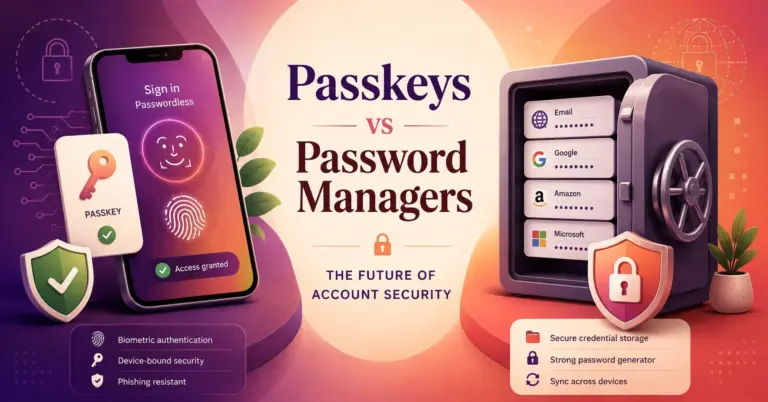
Passkeys are also becoming more important. The FIDO Alliance describes passkeys as phishing-resistant and designed to reduce risks from phishing, credential stuffing, and remote attacks because there is no reusable password for attackers to steal. (FIDO Alliance)
Breach Monitoring
Breach monitoring checks whether an email address, password, or credential appears in known breach data. Have I Been Pwned offers a Pwned Passwords service that helps services check whether a password has appeared in breach corpuses. (Have I Been Pwned) Many password managers include similar alerts, although the depth and method vary by provider.
Use breach monitoring as an early-warning system, not as your only defense. The better defense is unique passwords everywhere.
Best Password Manager for Families
A family password manager should solve sharing without creating chaos. Families usually need to share some credentials but not all credentials. A parent may need to share Netflix, school portals, insurance, Wi-Fi, a family email account, or emergency documents. But nobody wants every private login visible to everyone.
Best Family Features to Look For
A strong family password manager should include:
- Private vaults for each person.
- Shared vaults for household logins.
- Emergency access or account recovery options.
- Easy mobile apps for less technical family members.
- Browser extensions for Chrome, Edge, Firefox, and Safari.
- Clear permissions for who can view, edit, or manage shared items.
- Secure notes for passports, insurance details, recovery codes, and Wi-Fi credentials.
1Password’s family plan promotes shared vaults, simple admin controls, and support for up to five family members on the plan page. (1password.com) Bitwarden’s pricing page describes family sharing, premium accounts for family members, emergency access, vault health alerts, and password coaching. (Bitwarden) Proton Pass describes storage and syncing for passwords, passkeys, email aliases, and secure sharing. (Proton)
Practical Family Vault Setup
A clean family setup might look like this:
| Vault | Who Can Access | What Goes Inside |
|---|---|---|
| Personal vault | One person only | Email, banking, work accounts, personal notes. |
| Household vault | Parents/guardians | Utilities, rent/mortgage portal, insurance, tax documents. |
| Entertainment vault | Whole family | Streaming services, gaming accounts, shared subscriptions. |
| Emergency vault | Trusted adult or emergency contact | Recovery codes, key documents, instructions. |
Do not dump everything into one shared vault. That creates the same problem as a shared spreadsheet, just with better encryption.
Best Password Manager for Freelancers
Freelancers have a different risk profile. They often manage personal accounts, client accounts, business tools, payment platforms, tax systems, website hosting, domain registrars, email marketing platforms, and project-management apps. One messy password habit can affect multiple clients.
A freelancer should choose a password manager that makes separation easy.
Freelancer Vault Structure
| Vault | Use |
|---|---|
| Personal | Personal email, banking, shopping, social accounts. |
| Business admin | Accounting, invoicing, tax, business email, domains, hosting. |
| Client A | Client-specific hosting, CMS, analytics, social, ad accounts. |
| Client B | Separate client-specific credentials. |
| Archive | Old client credentials kept only when contractually necessary. |
This structure matters. When a project ends, you can review only that client’s vault, transfer credentials, remove your access, and avoid accidentally keeping active logins.
Freelancer Buying Criteria
Freelancers should prioritize:
- Multiple vaults or collections.
- Secure sharing links.
- Browser extension reliability.
- Mobile access.
- File attachments for recovery codes.
- Passkey storage.
- Export options.
- Strong free or low-cost plan.
- Clear separation between personal and client work.
Bitwarden is strong for freelancers who want value and transparency. 1Password is strong for freelancers who want polish, easy sharing, and family/business expansion later. Proton Pass is attractive for privacy-conscious freelancers, especially those who use email aliases heavily.
Best Password Manager for Small Businesses
For a small business, the password manager is not just a personal productivity tool. It becomes part of identity and access management.
A business password manager should help with:
- Employee onboarding.
- Employee offboarding.
- Shared team vaults.
- Role-based access.
- Admin reporting.
- Audit logs.
- MFA enforcement.
- Password health reports.
- Access reviews.
- Recovery workflows.
- Directory, SSO, SCIM, or SIEM integrations when needed.
Dashlane says business users get encrypted vaults for passwords and passkeys, secure sharing, and a centralized admin console for monitoring and enforcing security policies. (Dashlane) Keeper’s business pricing page describes admin consoles, credential sharing, shared team folders, delegated administration, integrations, and business/enterprise plan options. (Keeper® Password Manager & Digital Vault) Bitwarden offers business and enterprise features including granular access control, passwordless SSO integration, account recovery, self-hosting flexibility, and family plans for users on some business tiers. (Bitwarden)
Small Business Workflow
A practical small-business rollout should follow this order:
- Choose the password manager.
- Create the admin account with strong MFA.
- Create groups such as Admin, Finance, Marketing, Sales, Contractors, and Developers.
- Create shared vaults by department or function.
- Import credentials carefully.
- Rotate old shared passwords.
- Invite employees.
- Require MFA.
- Train staff on autofill, secure sharing, and phishing warnings.
- Review access monthly.
- Remove access immediately when someone leaves.
The most important step is offboarding. If a staff member leaves and still knows the password to the domain registrar, payment gateway, email marketing account, or hosting provider, the business has not really offboarded them.
Built-In Browser Password Managers vs Dedicated Password Managers
Built-in tools have improved. Google Password Manager stores passwords in a Google Account and makes them available across Android and Chrome devices. (Google Password Manager) Apple’s Passwords app stores passwords, passkeys, Wi-Fi passwords, and credentials, with syncing across Apple devices and Windows support. (App Store)
For an individual inside one ecosystem, these tools may be enough. They are convenient, free, and already integrated.
But dedicated password managers usually make more sense when you need:
- Cross-platform sharing.
- Family vaults.
- Business admin controls.
- Employee offboarding.
- Client credential separation.
- Detailed vault permissions.
- Secure external sharing.
- Audit logs.
- Compliance documentation.
- Advanced recovery workflows.
For families and businesses, dedicated tools are usually easier to govern. Browser tools are convenient; dedicated password managers are more structured.
Passkeys: Do They Replace Password Managers?
Not yet.
Passkeys are a major improvement for accounts that support them. They reduce the risk of phishing and credential stuffing because there is no reusable password to steal. The FIDO Alliance describes passkeys as based on public-key cryptography and designed to be phishing-resistant. (FIDO Alliance)
But many accounts still use passwords. Many businesses still have shared logins. Families still need to store Wi-Fi passwords, insurance portals, school accounts, streaming accounts, recovery codes, and secure notes. Freelancers still need to manage client credentials.
So, the better approach is not “password manager vs passkeys.” It is:
- Use passkeys where supported.
- Use unique generated passwords where passkeys are not supported.
- Store recovery codes securely.
- Keep MFA enabled.
- Use a password manager that can handle both passwords and passkeys.
Tool-by-Tool Analysis
1Password
1Password is a strong fit for families, freelancers, and small businesses that value usability. It has polished apps, strong sharing flows, and business-friendly controls. Its product pages highlight password, passkey, secret, and access-management use cases. (1password.com)
Its personal/family offering mentions a Secret Key and Travel Mode, both of which differentiate it from simpler tools. (1password.com) Travel Mode can be useful for people who want to temporarily remove selected vaults from devices while traveling. (1password.com)
Best fit: families that want a clean experience; freelancers who want separate vaults; businesses that may later need admin controls.
Check before buying: current pricing, plan limits, recovery options, and business integration requirements.
Bitwarden
Bitwarden is a strong choice for users who care about transparency, price, and flexibility. It is open source, and the company says its source code is hosted on GitHub for review, audit, and contribution. (Bitwarden) It also supports self-hosting for organizations that want to run the password manager on their own server. (Bitwarden)
Bitwarden’s security whitepaper emphasizes end-to-end encryption and zero-knowledge design. (Bitwarden)
Best fit: budget-conscious families, freelancers, developers, technical teams, and businesses that want self-hosting or open-source visibility.
Check before buying: whether the interface is simple enough for your household or team.
Keeper
Keeper is a serious option for small businesses that want structured administration. Its security documentation describes zero-knowledge design and local key derivation. (Keeper Docs) Its business plans emphasize admin consoles, shared folders, delegated administration, integrations, and enterprise governance. (Keeper® Password Manager & Digital Vault)
Best fit: small businesses that need stronger control over users, teams, and policies.
Check before buying: which features are included in the base plan and which require add-ons.
Dashlane
Dashlane is positioned strongly around business password management and credential-risk protection. Its site says employees get encrypted vaults for passwords, passkeys, and secure sharing, while admins get a centralized console for monitoring and policy enforcement. (Dashlane)
Because password managers are high-value targets, buyers should also review current incident history before subscribing. Recent reporting said Dashlane investigated a May 31, 2026 incident in which encrypted vaults from a small number of personal accounts were downloaded after attackers abused device registration, while Dashlane stated the vaults still required master passwords for decryption under its zero-knowledge model. (IT Pro)
Best fit: teams focused on credential visibility, monitoring, and employee risk reduction.
Check before buying: latest security advisories, plan features, and whether business controls match your risk level.
NordPass
NordPass is a clean, approachable password manager from Nord Security. Its app listing describes support for passwords, passkeys, passcodes, card details, Wi-Fi passwords, PIN codes, and secure notes in an encrypted vault. (App Store)
Best fit: users and small teams that want an easy interface without heavy configuration.
Check before buying: business plan depth, admin reporting, and integration needs.
Proton Pass
Proton Pass is attractive for privacy-focused users. Proton describes it as storing and syncing passwords, passkeys, email aliases, and other data across devices. (Proton) Email aliases are especially useful for people who want to reduce tracking and contain breach exposure.
Best fit: privacy-conscious families, freelancers, and users already using Proton Mail or Proton services.
Check before buying: business admin features, shared vault limits, and migration workflow.
KeePass and KeePassXC
KeePass is a free, open-source password manager that stores passwords in an encrypted database unlocked with one master key. (KeePass) KeePassXC is a modern open-source option that stores sensitive information in an offline encrypted file and can be used on Windows, macOS, and Linux. (KeePassXC)
Best fit: technical users who want offline control and do not need polished family or business sharing.
Check before using: backup strategy, sync safety, mobile access, recovery process, and plugin risk.
Common Password Manager Mistakes
Mistake 1: Reusing the Master Password
Your master password must be unique. Never reuse an old email, bank, hosting, or social-media password.
Mistake 2: Sharing Everything With Everyone
Shared vaults should be specific. A family entertainment vault should not contain banking logins. A contractor vault should not contain payroll credentials.
Mistake 3: Forgetting Recovery Codes
Many people enable MFA and then lose the recovery codes. Store recovery codes in a secure note or print them and lock them somewhere safe.
Mistake 4: Not Rotating Old Shared Passwords
When moving from a spreadsheet or shared document, rotate the passwords. Importing compromised or over-shared passwords into a better vault does not make those old passwords safe.
Mistake 5: Ignoring Offboarding
When an employee, contractor, or client relationship ends, remove access and rotate shared credentials. This is one of the highest-value business uses of a password manager.
How to Migrate Safely
Migration should be deliberate. Do not rush it.
- Choose the new password manager.
- Turn on MFA for the password manager.
- Create a strong master password.
- Export from the old tool only when necessary.
- Import into the new vault.
- Delete export files immediately after import.
- Review weak, reused, and breached passwords.
- Prioritize email, banking, domain registrar, hosting, payment, payroll, and admin accounts.
- Change reused passwords.
- Create shared vaults only after cleanup.
- Train every family member or employee.
For businesses, start with the highest-risk accounts: email admin, domain registrar, hosting, cloud infrastructure, payment gateway, accounting, payroll, CRM, ecommerce admin, and social-media business accounts.
Final Buying Checklist
Before choosing a password manager, ask:
| Question | Why It Matters |
|---|---|
| Does it support all devices we use? | Mixed households and remote teams need cross-platform access. |
| Does it support private and shared vaults? | Prevents oversharing. |
| Does it support passkeys? | Helps future-proof account security. |
| Does it have breach alerts? | Helps identify exposed accounts. |
| Does it support MFA for the vault? | Protects the master account. |
| Can admins remove users quickly? | Critical for small businesses. |
| Are audit logs available? | Helps with accountability. |
| Can we export our data? | Avoids lock-in. |
| Is pricing clear? | Prevents surprise plan upgrades. |
| Is there current security documentation? | Builds trust. |
9. FAQ Section
What is the best password manager for most families?
For most families, 1Password and Bitwarden are strong starting points. 1Password is polished and easy to adopt, while Bitwarden is strong for value and transparency. Proton Pass is also worth considering for privacy-focused families.
What is the best password manager for a small business?
Keeper, 1Password, Bitwarden, Dashlane, and NordPass are all realistic small-business options. The right choice depends on whether the business needs simple sharing, admin controls, audit logs, SSO, directory sync, or compliance documentation.
Is a password manager safer than writing passwords down?
Usually, yes. A reputable password manager can generate unique passwords, autofill the correct website, warn about weak or reused passwords, and encrypt your vault. A notebook may be offline, but it cannot detect phishing pages, support remote access, or manage business sharing.
Should freelancers use a business password manager?
A solo freelancer can often start with an individual or family plan, but freelancers handling client credentials should use separate vaults or collections. Once subcontractors or employees are involved, a business password manager becomes safer.
Are browser password managers enough?
They can be enough for some individuals. Google Password Manager and Apple Passwords are convenient built-in options. Dedicated password managers are usually better for families, freelancers, and businesses that need sharing, permissions, auditability, and cross-platform control.
Do password managers support passkeys?
Many modern password managers support passkeys, but support varies by provider, platform, and website. Buyers should verify current passkey storage and syncing features before choosing a plan.
What happens if I forget my master password?
That depends on the provider and plan. Some family and business plans offer recovery workflows. With strict zero-knowledge systems, the provider may not be able to recover your vault if you lose the master password and recovery method.
Is it safe to share passwords through a password manager?
It is much safer than sending passwords through email, chat, spreadsheets, or screenshots. Use shared vaults or secure sharing links, and remove access when the person no longer needs it.
10. Conclusion
The best password manager is the one that matches your real access problem.
For families, focus on private vaults, shared household vaults, easy recovery, and simple apps. For freelancers, focus on separating personal, business, and client credentials. For small businesses, focus on admin controls, offboarding, shared folders, audit logs, MFA enforcement, and access reviews.
A password manager will not fix every security problem. It will not stop every phishing attack, protect an infected device, or replace good access policies. But it can remove one of the biggest everyday risks: reused, weak, and casually shared passwords.
For most readers, the right move is simple: pick a reputable password manager, create a strong master password, enable MFA, import carefully, rotate reused passwords, and organize vaults around how your household or business actually works.