Cisco Firewall Migration Manager: Migrate with Confidence
Firewall migration is one of those projects that looks straightforward on a whiteboard and becomes complicated fast during execution. Configuration dependencies you did not know existed. Interruptions that force you to start over. Cutover windows that suddenly feel too tight. These have long been the norm of firewall migration projects, not edge cases. For many organizations, the risk and effort of migration is exactly what delays the security modernization they have already decided to pursue.
That is why we are introducing Firewall Migration Manager by Cisco, an enterprise-ready product built for that reality. Whatever you run today, it gives you one predictable path to Cisco Secure Firewall Threat Defense (FTD). You get predictable timelines, resilient workflows, and clear visibility at every stage. Our goal is simple: take the friction out of migration.
What Is Firewall Migration Manager?
Firewall Migration Manager is a dedicated migration application that you run in your own environment. At general availability, it installs as a desktop application for both macOS and Windows. You run migrations locally. No dedicated infrastructure required.
It supports migrations from Cisco ASA today, with support for Cisco FDM and third-party platforms (including Check Point, Palo Alto Networks, Fortinet, and Juniper) on the way. The goal is a single, consistent migration experience regardless of what you are moving from.
The product preserves the configuration elements that matter. The network objects, object groups, time ranges, domain names, interfaces, routing configurations (including BGP and EIGRP), NAT rules, VPN settings, and high availability configurations are retained as is. It is built around how enterprise migrations actually work, with dependencies, interruptions, and validation requirements at every step.
How Firewall Migration Manager Works
The migration process follows a clear, guided workflow. It starts with your source firewall configuration and ends with a validated, optimized configuration deployed to your target FTD. Each stage is transparent, resumable, and auditable.
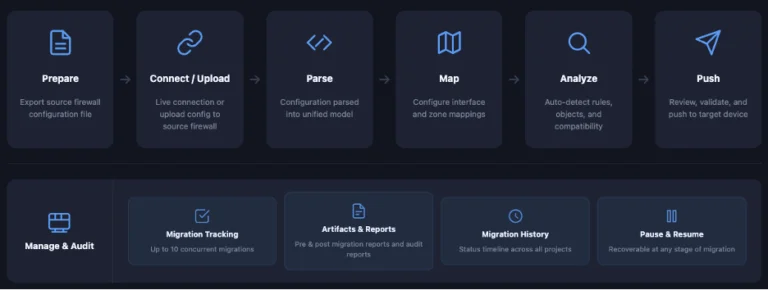
The workflow begins when you either upload a configuration file or establish a live connection to your source firewall. Firewall Migration Manager’s modular parsing engine extracts the configuration and converts it into a consistent internal model that works across all supported vendors. From there, the configuration goes through mapping, validation, and optimization before you review it and, when ready, deploy it to Cisco Secure Firewall Management Center (FMC) and your target FTD.
What Firewall Migration Manager Delivers
The product is designed around outcomes. It targets the points where migration programs lose momentum, from the speed of the migration itself to the experience of the people running it.
Run Many Migrations, Not Just One at a Time
One of the product’s most significant operational features is the migration dashboard. It supports up to ten concurrent migrations in a single management view. You are no longer limited to one migration at a time.
Every migration, active or completed, is accessible from the dashboard. Open any past migration and review its full set of artifacts: optimization reports, pre- and post-migration reports, audit trails, and deployment history.
For Cisco partners managing multiple customer engagements simultaneously, this is a meaningful shift. For customers running phased rollouts across sites or device classes, it removes the restart-and-track friction that has historically slowed multi-site migration programs.
Plan with Confidence. Move Faster.
Migration timelines should be estimable before you start. The product lays out the full process up front: steps, dependencies, and what to expect at each stage. Teams can plan with confidence. Large configurations parse in minutes, and fast processing and push times to Cisco FMC and FTD keep enterprise-scale migrations on schedule. Whether you are migrating a large ASA configuration or a complex third-party policy set, the process feels fast. You know what is coming at each step, and when.
Pause and Resume – No Restarts
The product’s workflow orchestrator manages state throughout the migration. You can pause and resume at any stage, so a failure or interruption never means starting over. For the administrator, that means you never redo completed stages, and a parsed configuration stays ready for the final push during your cutover window. No restarts needed, and no lost work.
See Issues in Context
Migration does not always go exactly as planned. When issues arise, the product’s workflow manager surfaces them in context, guiding teams through what needs attention and why. You do not wait until the end of a migration cycle to find problems. Teams see issues as they emerge, understand their impact, and act on them directly within the workflow. The result is a process that is easier to follow, easier to course-correct mid-flight, and easier to hand off when support is needed. AI-assisted troubleshooting is planned for a future release.
Faster Time to Resolution
When something needs to be diagnosed, the product gives Cisco Support and partner teams the context they need to move quickly. Troubleshooting bundles and clear state history reduce the time spent reproducing an issue.
One Consistent Cisco Experience
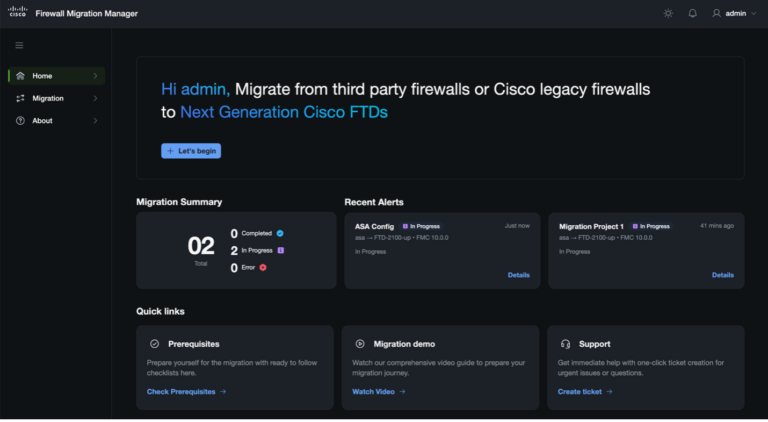
The product shares the same interface and interaction model used across Cisco Cloud Control and the broader Cisco Secure Firewall portfolio. For teams that use other Cisco products, the experience feels familiar from day one. Under the interface, the workflow is straightforward. Migrations follow four clear steps. Select Firewalls. Perform Mappings. Review the parsed configuration. Push. Each step’s scope and next action are visible at a glance, so teams spend less time navigating and more time validating the migration itself.
Built for the Environments You Actually Work In
Enterprise environments are not uniform, and the product is designed to meet teams where they are. It deploys to the form factor that fits: a local machine or a virtual machine. That makes it straightforward to adopt without specialized infrastructure. It also supports air-gapped deployments, where the migration runs entirely inside a customer’s controlled network. For teams that prefer a cloud-managed experience, support within Cisco Cloud Control is coming soon.
Where We Are Headed Next
Cisco’s investment in Firewall Migration Manager is focused on making migrations smarter, more transparent, and more trustworthy at every stage. A few of the directions we are investing in:
- Broader platform coverage: expanding supported migration sources beyond the launch set, so more teams can consolidate onto Cisco Secure Firewall Threat Defense from whatever they run today.
- Deeper validation and optimization: pre-deployment testing and rule optimization, so teams can evaluate a plan before committing and arrive at a cleaner, more maintainable configuration.
- Intelligent, integrated migration: Firewall Migration Manager will also come to Cisco Cloud Control, and AI will play an increasing role in guiding teams before and during migration.
The items above describe Cisco’s current product direction and are not commitments to specific features or timelines.
Planning a migration to Cisco Secure Firewall Threat Defense, or managing one across multiple sites? Firewall Migration Manager is where it starts.